Loading data - hands-on
This manual explains how to load data in Fabric using various notebooks for different loading methods. The following default loading notebooks are available in the Meta workspace folder:
- DAG \ DAG_Complete
- DAG \ DAG_Loader_Bronze
- DAG \ DAG_Loader_Silver
- DAG \ DAG_Gold
- DAG \ DAG_Tabular
- Loaders \ Load_Bronze
- Loaders \ Load_Silver
- Loaders \ Copy_Data_Lakehouses
- User \ USR_TR_Helper (an example of a personal user notebook with user-specific scripts)
Each notebook includes a description in its Markdown cells. This manual focuses on the workflow and how these notebooks can be used in daily operations.
Known limitations
Keep in mind that the default options for Fabric are relatively new and sometimes limited. For example, not all options normally available for a DAG (Directed Acyclic Graph) are supported yet. As a result, in some cases, we use a simpler approach, even though a full DAG can handle more advanced tasks. The layer loaders run their objects on a thread pool, wave by wave; whether the children share one Spark session or run as separate Fabric jobs depends on the notebook template (Spark or Python) chosen in config.yaml.
When opening a notebook and change the contents, it will be saved to the workspace automatically. Those changes will affect a scheduled load when there is no new deploymentThe process of "pushing a button" to make your configuration actual, working software in the cloud. in between. So it's better to call the notebook from a personal notebook via a Run statement. At the end some examples are provided.
DAG_Loader_Bronze
This notebook loads the Bronze layer for a workspace (e.g., DEV, TST, PRD). It reads the object YAMLA simple way to write configurations. It's basically a list that computers can read easily. files, groups them by load order and runs a DAG per load order group. Each task in the DAG calls the Load_Bronze notebook. Use the folder_path parameter to filter which objects are loaded.
| Parameter | Default | Description |
|---|---|---|
folder_path | "Files/Objects" | Folder with the object YAML files to load. Point at a subfolder to load a single source. |
folder_path_except | None | Folder(s) to exclude from the run. |
file_exceptions | None | Specific files to exclude (format: Folder/File.yaml). |
config_file | "Files/Configuration/config.yaml" | Configuration file on the Meta lakehouseA place where you store both "raw" data (like files) and "organized" data (like tables). It combines the best of a File Cabinet and a Database.. |
skip_prebronze | False | Skip the pre-bronze notebooks for this run. |
skip_midbronze | False | Skip the mid-bronze notebooks for this run. |
skip_postbronze | False | Skip the post-bronze notebooks for this run. |
skip_stale_check | False | Skip the stale-file validation (bronzemaxfileagehours) for this run. |
force_reload_bronze | False | Reload even when the source files are unchanged. |
dry_run | False | Log what would be loaded without loading anything. |
timeout_per_group | 10800 | Timeout in seconds per load order group (default 3 hours). Past it the group stops starting new objects and the loader continues with the next group. |
DAG_Loader_Silver
The Silver counterpart works the same way: each task calls the Load_Silver notebook. Run it after Bronze so it can pick up what Bronze produced. It shares folder_path, folder_path_except, file_exceptions, config_file, dry_run and timeout_per_group with the Bronze loader, and has its own override flags:
| Parameter | Default | Description |
|---|---|---|
skip_presilver | False | Skip the pre-silver notebooks for this run. |
skip_postsilver | False | Skip the post-silver notebooks for this run. |
force_reload_silver | False | Rebuild silver in full from bronze even when silver is already up to date. |
DAG_Gold and DAG_Tabular
Gold is loaded by the separate DAG_Gold notebook, which takes a model_name (e.g. DM). If you have multiple models, run DAG_Gold once per model with the desired model_name. DAG_Tabular refreshes the tabular (semantic) model afterwards, also per model_name.
DAG_Complete
DAG_Complete chains the whole run — DAG_Loader_Bronze, DAG_Loader_Silver, DAG_Gold and DAG_Tabular — in one notebook. In PRD, this is the notebook to schedule for loading the workspace with fresh data. It takes the shared filtering parameters (folder_path, folder_path_except, file_exceptions), the model_name for Gold/Tabular, and optional table filters (table_include, table_exclude, table_types).
How to run a notebook without touching the original
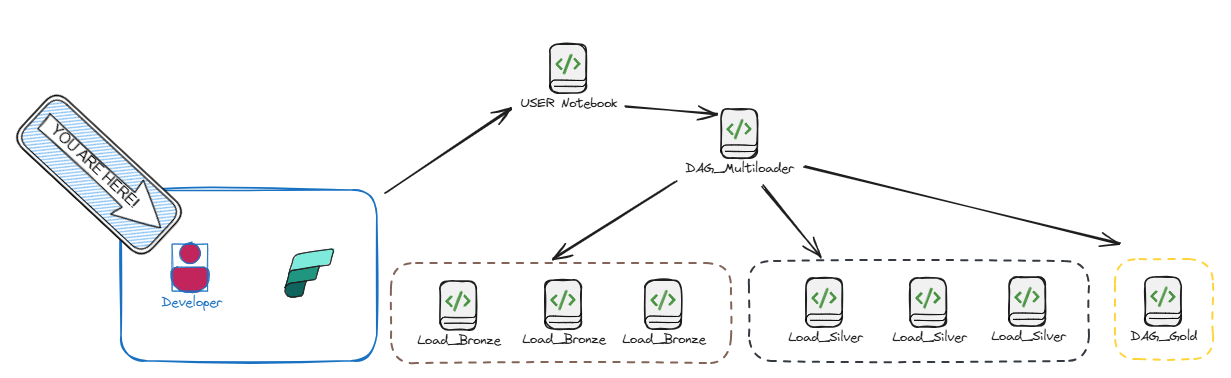
Open your own personal notebook in the User folder and use the script below to call the loaders.
import json

folder_path = "Files/Objects"

params = {
    "folder_path": json.dumps(folder_path),
}

# Load Bronze, then Silver (Silver reads what Bronze produced)
notebookutils.notebook.run("DAG_Loader_Bronze", 83200, params)
notebookutils.notebook.run("DAG_Loader_Silver", 83200, params)

# Gold runs separately, keyed on the model name
notebookutils.notebook.run("DAG_Gold", 83200, {"model_name": json.dumps("DM")})
Common Scenarios
Use the table below to adjust the parameters for your specific needs:
| Scenario | Notebook | Parameters |
|---|---|---|
| Load Bronze | DAG_Loader_Bronze | folder_path="Files/Objects" |
| Load Silver | DAG_Loader_Silver | folder_path="Files/Objects" |
| One Source Folder (Bronze) | DAG_Loader_Bronze | folder_path="Files/Objects/MySource", skip_prebronze=True |
| Full refresh incl. Gold/Tabular | DAG_Complete | folder_path="Files/Objects", model_name="DM" |
Loading a single object with overrides
For testing or re-loading one object you can call Load_Bronze directly with a small DAG. The notebook takes the object_yaml_file and an overrides parameter — a JSON object with the flags that change the default validation for that run only:
import json

object_yaml_file = "Files/Objects/AdvWorks/orders.yaml"

overrides = {
    "skip_stale_check": True,   # old file, but still the correct data
    "skip_prebronze": True,     # don't re-run the pre-bronze notebook
    "force_reload_bronze": True,  # reload even if the source is unchanged
}

DAG = {
    "activities": [
        {
            "name": "Load_Bronze_1",
            "path": "Load_Bronze",
            "timeoutPerCellInSeconds": 3600,
            "args": {
                "object_yaml_file": object_yaml_file,
                "overrides": json.dumps(overrides),
            },
        }
    ]
}

notebookutils.notebook.runMultiple(DAG)
| Override | What it does |
|---|---|
skip_prebronze | Skips the pre-bronze notebook. The data load still runs — only that hook is skipped. Useful when a pre-bronze step fetches fresh source data you don't want during a test. |
skip_midbronze | Skips the mid-bronze notebook. |
skip_postbronze | Skips the post-bronze notebook. |
skip_stale_check | Skips the stale-file validation (bronzemaxfileagehours). Use when a file is older than the window but still the data you want — e.g. an extra run after the normal schedule. An INFO line is logged. |
force_reload_bronze | Reloads even when the source files are byte-for-byte unchanged (disables bronzeskipifsourceunchanged). |
force_reload_silver | On Load_Silver: rebuilds silver in full from bronze even when silver is already up to date. Use when Bronze.his was corrected retroactively (same timestamps, changed values), which the up-to-date check would otherwise skip. |
Each flag controls one thing, and they're independent — force_reload_bronze only disables the unchanged-source skip, not the stale check, so they don't conflict. The stale check runs even when the source is unchanged (so a supplier that stopped delivering, leaving an old file in place, is caught instead of skipped); use skip_stale_check to suppress it. All overrides default to False (omit them for normal behaviour). The hook and reload flags above are Bronze; Load_Silver accepts skip_presilver / skip_postsilver / force_reload_silver the same way. force_reload_silver is the silver counterpart of force_reload_bronze — it rebuilds Silver.his from all of Bronze.his (the flag-driven equivalent of manually truncating Silver.his before a run), and does nothing on the keephistory: false path, which reloads every run anyway.